

A confirmed order is not enough. If your shop sells online, the tax data, the XML file and the submission to the SdI must follow a specific process.
The WooCommerce electronic invoicing It can reduce manual work and errors, facilitating the digital transition. The checkout system, plugins and management software must all be compatible; otherwise, a hastily carried out configuration will result in correct orders but incorrect invoices.
It’s a problem that always seems to crop up at the worst possible moment. Start with a simple, tried-and-tested process that’s suited to your type of sales and the relevant tax regimes. If you handle electronic payments, check whether you need a separate process.
Key points
- WooCommerce processes the order, but you need a plugin or an integration to generate the XML, send it to the SdI and manage the receipts.
- The courtesy invoice in PDF format does not replace the tax document submitted to the Interchange System.
- Configure the checkout process, tax details, tax rates and order status in the back-end system, and test them in the staging environment for private customers, businesses, refunds and different VAT rates.
- Manage TD04 credit notes, VIES validation and tax regimes correctly for EU and non-EU sales, digital products and subscriptions.
- After publication, check the SdI results, update plugins and routes, carry out backups and periodically check the workflow, including on mobile devices.
WooCommerce electronic invoicing: what happens after an order is placed
WooCommerce records the purchase, but does not automatically generate an electronic invoice valid for the Interchange System. An integration is required to collect the data, generate the document in XML format and transmit it via an authorised channel.
The courtesy invoice in PDF format, sent by email, is useful to the customer. It does not replace the document submitted to the SdI.
From the order to the XML document
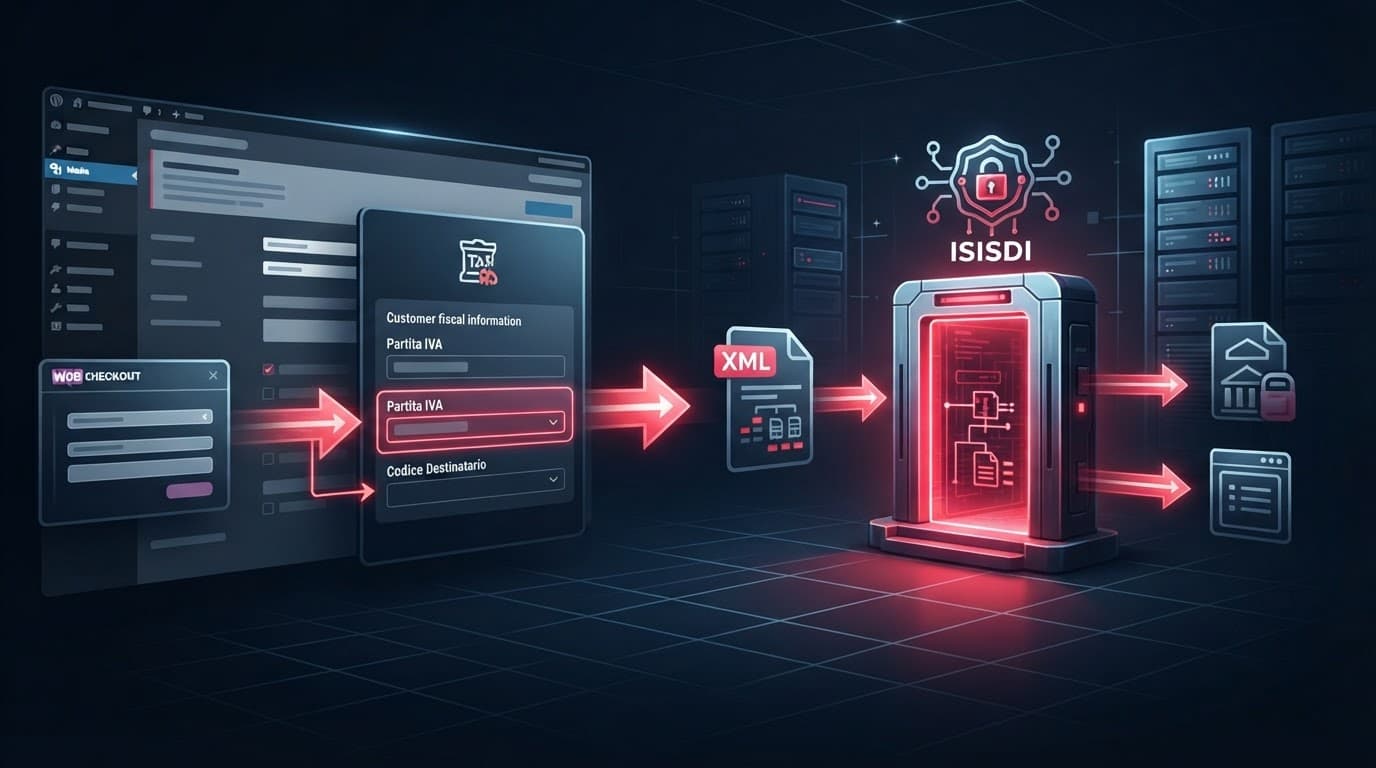
The plugin reads the order details: header, tax details, tax code or VAT number, address, VAT rate, products, any stamp duty and payment method. It then generates the document in accordance with the required format.
The next step is to send it to the Interchange System. The system checks the document and returns various types of receipt: delivery, non-delivery, rejection or inability to deliver. Simply creating the document does not mean that the invoice has been received correctly.

Private customers, businesses and professionals
The checkout process must distinguish between private customers and those with a VAT number. It must also collect tax details, which are different from those used for electronic payments. For private individuals, the recipient code “0000000” is used in many cases. Businesses and professionals may request a certified email address (PEC) or a dedicated delivery channel.
The’The Italian Revenue Agency clarifies how to enter client details: In the section for the transferee or client, the VAT number or tax reference number must be stated, as appropriate.
A rejected electronic invoice has not been issued. It must be corrected and resubmitted within the specified time limit, without marking it as completed.
Which solution should you choose for your e-commerce business?
There is no such thing as the perfect plugin for everyone. A small shop with few orders has different needs to a B2B e-commerce site with price lists, European customers and frequent refunds.
Before making your choice, check where the data is stored, who handles the submission to the SdI, and what the management costs are. Also check the renewal terms and what happens if you switch providers.
WordPress plugin or cloud service?
A WordPress plugin can generate the XML format directly from the WooCommerce dashboard. This is handy if you want to store orders and documents on your website, but it requires regular maintenance, backups and controlled updates.
A SaaS service, on the other hand, connects WooCommerce to an external platform. It usually combines document submission, storage and management within a single environment. Check who offers substitute storage and for how long.
| Solution | Costs to be assessed | When it makes sense |
|---|---|---|
| Plugins with XML | Annual licence, support, any submission credits | Small shops or workflows already managed in WordPress, with products such as Easy Fattura Elettronica |
| SaaS service | Licence fee, application form, retention and renewals | Companies wishing to centralise their accounts and documents using Fatture in Cloud or similar platforms |
| Tailored integration | Development, APIs, technical maintenance | E-commerce with ERP, business management software or non-standard processes |
Easy Fattura Elettronica may have a listed annual fee of 49.99 euros plus tax, but the price should be checked against the current price list. The service linked to Aruba Fatturazione Elettronica can start from €29 plus VAT for the first year, with additional services to be checked. Always compare renewals and recurring costs, not just the initial promotion.
Before purchasing or renewing Easy Fattura Elettronica, check the support services, response times and export options. If you want to centralise your accounts and documents, also check that Fatture in Cloud is compatible with your chosen accounting software.
For a larger project, set up an online shop with WooCommerce It also requires an assessment of hosting, security, payments, delivery and technical support.
A PDF generator isn’t enough
A PDF generator does not, on its own, create an electronic invoice intended for submission to the SdI.
Tools such as WooCommerce PDF Invoices can generate a neat, professional-looking invoice for the customer. YITH WooCommerce Invoices can also create an invoice, but the document is for information purposes only.
A courtesy invoice does not replace the tax submission to the SdI. Therefore, WooCommerce PDF Invoices and YITH WooCommerce Invoices do not constitute an electronic invoice transmission system.
Look for specific features: XML format compliant with current specifications, automatic submission or connection to an intermediary, management of receipts and credit notes, configurable numbering, export functionality, and support for EU and non-EU orders. For the retail sector, also check for support for electronic payments and the applicable tax regimes.
Configure the plugin without complicating the checkout process
The setup begins with the company’s tax details. The company name, VAT number, tax registration number, address, tax regimes, VAT rates and numbering schemes must be consistent with the accounting software and the accountant’s records. If the accounting software is linked to Fatture in Cloud, map the numbering schemes and rates first.
Don’t wait for your first actual order to find out.
The right tax fields at the right time
Only display the necessary fields at checkout, without turning the purchase into a form fit for an accountant. A private individual should not have to deal with requests designed for a business.
For business users, you can request a VAT number, tax code, certified email address (PEC) and recipient code. For sales within the European Union, verify the VAT number using the VIES validation system before applying the relevant tax treatment. If the result is invalid, suspend the transaction and repeat the VIES validation after asking the customer to correct their details.
Those who work with businesses, confidential pricing and customised catalogues can learn more about managing B2B customers on WooCommerce. Invoicing, user roles and VAT terms must remain consistent.
Set the order status that generates the invoice
This step is crucial. In some shops, the document is generated after payment; in others, after the order has been completed. Do not choose the tax trigger at random.
A courtesy invoice in PDF format should not be the sole indicator of tax invoicing. Always check the actual status of the document and ensure that WooCommerce PDF Invoices does not conflict with the order status.
Test this in a staging environment using at least the following scenarios:
- A purchase made by a private customer.
- A business customer with an Italian VAT number and VIES validation.
- A company order with delivery details.
- A partial refund.
- An order with a different VAT rate or a virtual stamp duty.
Check it on a smartphone too. Payment fields that are too small, awkward menus and buttons that are too close together can lead to lost sales. If the purchase rate drops, measure conversion rates, errors with mandatory fields and payment trigger activation separately for desktop and mobile. A seemingly good average can mask a mobile checkout that isn’t working properly.
Refunds, order changes and international sales in WooCommerce
Tax management for an e-commerce business must also cover exceptional circumstances. It is in these cases that the simplest solutions reveal their limitations.
WooCommerce refunds and TD04 credit notes
A technical refund does not automatically amend the electronic invoice. Where the transaction requires a correction document, the relevant XML must use type TD04.
The plugin must link the document to the original invoice, show the correct amounts and VAT, and submit it. Do not delete an invoice that has already been issued in order to correct a return. First, agree on the process with the person responsible for the accounts.
EU and non-EU transactions and digital products
For cross-border transactions, first verify the customer using the VIES validation process. The data is submitted in the required XML format, without a separate ‘esterometro’ file. The process is not automatic: save and double-check the result of the VIES validation.
Physical goods, services, online courses, downloads and subscriptions may be subject to different tax regimes. Only set the tax rates, VAT category and document type after checking the specific circumstances with your accountant.
The reference is fatturaPA 1.9.1: the Technical Specifications 1.9.1 of the Italian Revenue Agency They will be available from 15 May 2026. Plugins and connectors must be kept up to date with the current specification whenever codes or checks change.
Checks to prevent problems after publication
After the go-live, treat the shop as a system that requires maintenance. Check the SdI receipts regularly and deal with any failed transactions straight away. Ensure that the courtesy invoice remains separate from the XML document and does not replace it.
Check for updates to WordPress, WooCommerce and the tax extension. Also check the track record, including fatturaPA 1.9.1, and apply the updated technical specifications. An incompatible update may leave the shop operational but cause the tax functionality to stop working.
Back up your orders and settings regularly. Before a major update, test the workflow in the staging environment. If you use Fatture in Cloud, include the linked accounting software in your tests as well. After each update, test WooCommerce PDF Invoices and decide who will handle any errors, with priority support where necessary.
Also check the actual checkout process, especially on mobile. The required details must not disappear or only appear after too many clicks. For EU sales, schedule a VIES validation at regular intervals. If the shop also handles electronic payments, test that workflow separately. Speed, clarity of fields and a CTA such as “Complete your order” have just as much impact on the conversion rate as the design.
The official pages of the Italian Revenue Agency on electronic invoicing and payments These remain the reference for operational rules and electronic fees. Please consult them whenever procedures or technical specifications change.
A tax regime that does not hamper sales
The right choice isn’t the solution with the most features. It’s the one that actually manages orders, customers and tax compliance.
A well-managed electronic invoice ensures an accurate document, successful transmission and traceable receipts. The rest is just noise.
Test the most common and problematic orders before going live. A robust configuration reduces the need for manual corrections, accounting errors and customers being blocked from making payments.
Frequently Asked Questions about electronic invoicing in WooCommerce
Can I generate tax documents directly from the online shop?
Yes, using a plugin or an integration linked to an invoicing service. WooCommerce collects the order details, whilst the extension generates the electronic invoices and handles their submission to the Interchange System, either directly or via an intermediary.
Is the courtesy invoice sent to the customer in PDF format valid?
No. The courtesy invoice is a copy, not the tax file that is submitted. Tools such as WooCommerce PDF Invoices and YITH WooCommerce Invoices can generate the PDF, but submission to the SdI depends on the integrated solution.
How do I handle refunds and credit notes?
The technical refund for the order must be coordinated with the tax document. If a corrective document is required, an XML TD04 linked to the original invoice must be issued.
Do I always have to ask for all the contact details?
No. The fields must be tailored to the type of customer and the transaction. For private individuals, collect only the necessary information. For businesses and professionals, ask for the details required to issue and deliver the document.
Is the VIES check required for every EU sale?
It depends on the type of customer and the transaction. VIES validation should be discussed with your accountant, particularly in the case of intra-Community B2B sales.