

Many small and medium-sized businesses install Google Analytics on their website, check the number of visits at the end of the month, and leave it at that. It’s a costly mistake, often one that goes unnoticed. Traffic alone doesn’t tell you whether you’re growing, whether the people visiting your website are taking the actions that matter, or whether the budget you’re investing in advertising is actually delivering results. This guide is designed to change that way of working: you’ll learn to use GA4 not just as a visitor counter, but as a tool for making informed decisions, allocating resources more effectively and measurably improving your online presence.
Contents
- Why Google Analytics is essential for SMEs
- Effective planning: how to get started with clear objectives
- Data quality: consent, privacy and mistakes to avoid
- From data to strategy: how to optimise marketing and budgets
- Beyond the figures: the true value of analytics for SMEs
- Boost your online presence straight away with the right solutions
- Frequently Asked Questions about Google Analytics and SMEs
Key Points
| Full stop | Details |
|---|---|
| Objectives before data | It is essential to define what really matters to the business before collecting data using Analytics. |
| Quality data matters | Proper management of consent and privacy ensures that data is reliable and useful. |
| Analytics drives decision-making | Only accurate and objective reports lead to effective marketing strategies and budget optimisation. |
| No to vanity metrics | Looking beyond superficial figures to focus on conversions and real value is the key to success. |
Why Google Analytics is essential for SMEs
Let’s start with one thing that’s clear: simply having data isn’t enough. What makes the difference is knowing what to do with that data. SMEs that use Google Analytics superficially often find themselves misinterpreting the figures, drawing the wrong conclusions and investing in strategies that fail to deliver results. The problem isn’t the tool, but the approach.
As highlighted in a digital analytics guide For businesses, GA4 is a tool, whilst digital analytics is the approach and expertise that encompasses objectives, KPIs, frameworks and interpretation: using GA4 without a plan can result in data without effective decisions. This distinction is crucial. GA4 without a strategy is like having a map without knowing where you want to go.
That is why Google Analytics is strategically essential for SMEs:
- Link the data to actual targets: you can track how many users fill in a contact form, how many make a purchase, and how many call. Not just who visits.
- It reduces uncertainty in decision-making: Knowing which channel generates the most conversions means you can stop wasting your budget.
- Show the user’s journey: you can see where people leave the site, what they read and what they skip.
- It gives you a real competitive edge: Companies that analyse the data and act on it grow. The others stand still.
- It enables you to optimise the website over time: it is not a one-off analysis, but an ongoing process of improvement.
Key figure: SMEs that incorporate analytical data into their marketing decisions achieve significantly better results than those that rely solely on intuition.
Consider a practical example. You have a website that receives 3,000 visits a month. That sounds like a good result. But if only 2 out of 3,000 users fill in the contact form, you have a conversion rate of 0.07%, which is extremely low. Without Analytics set up correctly, you’d never know this. You wouldn’t even know which channel those two contacts came from, nor why the other 2,998 users leave without taking any action.
Those working in the professional services sector, for example in the website development for accountants, knows full well how crucial it is to measure not only visits, but also users’ actual actions. The website must work for you, and Analytics tells you whether it’s actually doing so.
The’the importance of web design User conversion is another factor that Analytics helps you measure: you can compare user behaviour across different pages and identify which visual or textual elements prompt users to take action.
Pro tip: Before opening any report in GA4, write down on a piece of paper the three most important actions you want users to take on your website. Only then should you check whether those actions are being tracked. If they aren’t, none of the data you’re looking at today is really useful.
Effective planning: how to get started with clear objectives
Now that we’ve established that a strategy is needed, let’s look at how to put one in place in practical terms. Setting up GA4 is the stage at which you decide what to measure and why. Many SMEs skip this step or delegate it to someone else without giving them clear guidance on the business objectives. The result is an account full of useless data and devoid of useful information.
The correct method involves the following key steps:
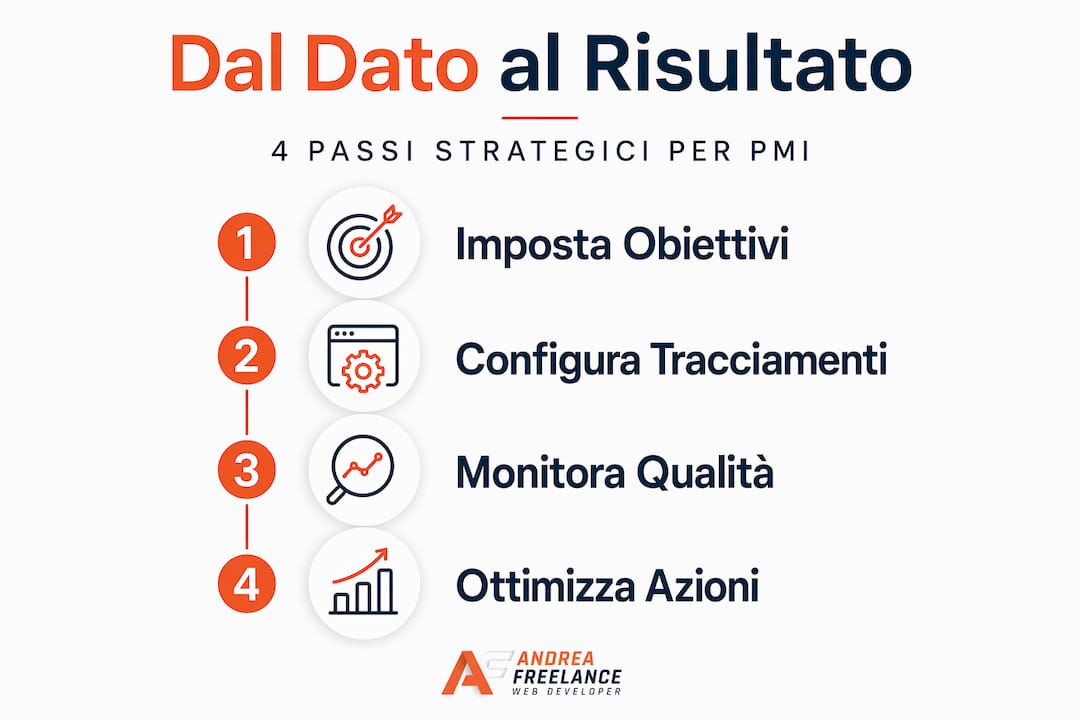
- Set your business objectives: Do you want to receive requests for quotes? Do you want people to sign up for the newsletter? Do you want direct sales via your e-commerce site? Each objective requires a different setup.
- Identify key conversions: A conversion is a user action that brings value to your business. It could be filling in a form, clicking on a phone number, making a purchase or downloading a PDF.
- Set up events in GA4: Events are the actions that GA4 tracks. Some are automatic (scrolling, clicks on external links), whilst others need to be set up manually via Google Tag Manager.
- Integrates with Google Search Console and Google Ads: Linking these tools to GA4 allows you to see the user’s entire journey, from their Google search right through to conversion on the website.
- Test everything thoroughly before considering it live: Use GA4’s real-time reports and debug extensions to check that events are being recorded correctly.
As indicated by a A practical guide to GA4 for SMEs, the correct approach involves accurately tracking events and conversions, as well as integrating tools such as Search Console and Ads, in order to map the user’s journey right through to the business objective, whether that be a form submission, a contact enquiry or a purchase.
The table below shows examples of typical conversions for different types of SMEs:
| Type of business | Main conversion | Event to be set up |
|---|---|---|
| Professional practice | Request for advice | Submit contact form |
| E-commerce | Purchase completed | Purchase event |
| Restaurant / bar | Table booking | Click on the booking link |
| Service agency | Download the brochure | File download event |
| High-street shop | Click on the address / map | Click on the Google Maps link |
This distinction between types of conversion is essential. A restaurant should not be measuring the same metrics as an e-commerce business. Yet a great many SMEs use GA4 without ever having customised anything, relying solely on automatic data which, on its own, tells us very little.
Among the useful tools for website managers, Google Tag Manager is what allows you to implement custom events without having to edit the website’s code every time. It is a free tool which, when combined with GA4, becomes an extremely powerful way to monitor user behaviour with precision.
Pro tip: Start with a maximum of three or four well-configured and monitored conversions, rather than twenty poorly tracked events. Data quality is always more important than quantity.
Data quality: consent, privacy and mistakes to avoid
Now that we’ve established the importance of a good configuration, let’s address an aspect that is often overlooked: the quality of the data collected. You may have a technically flawless configuration and the right conversions, but if cookie consent isn’t managed correctly, your data will be incomplete – and, worse still, misleading.

As highlighted in the official documentation on the Cookie settings in Google Analytics, without the correct cookie consent settings, GA4 data may be incomplete and could distort marketing analysis and optimisation, including that relating to Google Ads.
The key issue is this: many users, when they arrive on your website, see the cookie banner and opt out of tracking. If your system isn’t configured with Google’s Consent Mode v2, these visits simply aren’t recorded. Your report shows less traffic than there actually is, and the attribution of advertising campaigns becomes inaccurate.
Here are the main mistakes to avoid when managing data:
- Non-compliant cookie banner: A banner that does not offer a genuine choice between accepting and refusing renders consent invalid and may result in GDPR penalties.
- Failure to implement Consent Mode v2: without this setting, you will lose important data every time a user rejects cookies.
- No ongoing monitoring: Consent is not a one-off process. It must be reviewed periodically to ensure there are no “gaps” in data collection.
- Unfiltered internal traffic: if you do not block access from your office or your computer, the data will be skewed by visits that do not represent genuine users.
- No checks following website updates: Any changes to the website may disrupt tracking. After each update, you should always check that the events are still working.
As explained in an analysis on GA4 and error handling for e-commerce, the quality of GA4 data depends entirely on how the CMP (Consent Management Platform) and the tags communicate consent to one another. Testing and ongoing monitoring are required to avoid measurement gaps that compromise attribution and optimisation.
| Scenario | Impact on the data | Business risk |
|---|---|---|
| Consent Mode v2 enabled | Estimated data, even without consent | Bass: good overall accuracy |
| No Consent Mode | Users without consent are invisible | High: traffic and conversions underestimated |
| Non-compliant banner | Invalid consent, possible penalties | Very high: legal risk and incorrect data |
| Unfiltered internal traffic | Artificially inflated figures | Medium: distorted behavioural metrics |
For SMEs that want to improve one’s online presence In a structured approach, data quality is the foundation of everything. If the figures you are looking at are not reliable, any decision based on them is potentially wrong.
As regards legal matters and GDPR compliance, if you do not already have a go-to expert, you can consult specialists in GDPR and DPO consultancy which can help you bring your website’s consent management into line with the regulations.
Collecting poor-quality data is worse than not collecting any at all: it gives you a false sense of security and leads to decisions based on shaky foundations.
From data to strategy: how to optimise marketing and budgets
Once you have reliable data, the next step is to work out how to use it to achieve tangible results, rather than just looking at charts. This is when Analytics stops being a technical tool and becomes an ally in managing your business.
The starting point is always segmentation. Aggregated data tells you very little. Breaking down traffic by channel (organic, paid, social, direct, email) allows you to understand where to invest and where to cut back.
Here’s how to use GA4 reports strategically:
- Analyse by acquisition channel: Compare the conversions generated by organic traffic with those generated by paid traffic. If Google Ads costs 500 euros a month and generates 3 conversions, whilst SEO generates 10 conversions at no cost, you’ll know where to focus your efforts.
- Segment by device: SMEs often find that 60–70% of their traffic comes from mobile devices, but the conversion rate from mobile is much lower than that from desktop. This points to a problem with the mobile user experience that needs to be resolved.
- Identify the pages that convert and those that don’t: Not all the pages on your website carry the same weight. Some generate leads, whilst others do not. Analytics shows you which ones and allows you to improve the ones that aren’t working.
- Compare with industry benchmarks: the e-commerce conversion rates They vary by channel, sector and device. Knowing that your sector has an average rate of 2% and you are at 1% tells you that there is real room for improvement.
- Optimise the funnel step by step: GA4 allows you to build conversion funnels and see exactly where users drop out of the process. You can address that specific point rather than changing everything.
| Channel | Typical conversion rate | Cost per acquisition | Optimisation priorities |
|---|---|---|---|
| Organic search (SEO) | 2.5 – 4% | Low in the long term | High |
| Google Ads | 2 – 3.5% | High but immediate | Medium/High |
| Social media | 0.5 – 1.5% | Variable | Media |
| Email marketing | 3 – 5% | Very low | High |
| Direct traffic | 3 – 6% | Void | Monitoring |
As highlighted in an in-depth article on GA4 and tracking strategy, the recommended approach for SMEs is to start with their business objectives, define conversions and events that are consistent with those objectives, then link the channels and use reports to allocate budgets and optimise the funnel. It isn’t complicated, but it does require a systematic approach.
Even the best practice for Google Ads For small businesses, this highlights just how important it is to have accurate conversion tracking before investing in advertising campaigns: otherwise, you’re spending money blindly.
SMEs that have structured their tailor-made digital strategy Using data from Analytics, they are able to optimise their budget with surgical precision, eliminating waste and focusing resources on the activities that actually generate leads and sales.
Pro tip: Choose a maximum of five key metrics to monitor each month. Too many metrics lead to confusion. A few, but the right ones, provide clarity. Your five metrics must directly answer the following questions: Am I growing? Which channels are working? Where am I losing users?
Beyond the figures: the true value of analytics for SMEs
Having looked at how to move from data collection to action, I’d like to share a thought that you rarely come across in technical guides on GA4. Having worked with Italian SMEs for many years, I’ve noticed a recurring pattern: companies that use Analytics solely to monitor the figures rarely grow. Those that use Analytics to understand people, however, do.
Analytics figures are not an end in themselves. Behind every session there is a real person who searched for something, found your website, browsed a few pages and decided whether to stay or leave. Your job isn’t to look at how many people have visited, but to understand why they came, what they were looking for and why most of them leave without contacting you.
The most common mistake I see in SMEs isn’t technical: it’s conceptual. They measure so-called ‘vanity metrics’ – such as page views or average time on site – which make them feel good but don’t tell them anything useful. A user who spends ten minutes on your website without filling in any forms is worth no more than one who spends thirty seconds there and calls you straight away. Time spent on the site is not a measure of success.
The real distinction is between behavioural metrics and outcome metrics. The former tell you what users are doing; the latter tell you whether you are achieving your objectives. Only the latter should guide your decisions.
What I’d say to you, based on years of experience in the digital world, is this: SMEs that survive without growing are often those that look at the data without really analysing it. Those that grow are the ones that ask themselves the tough questions: why aren’t people converting? What’s missing from my online offering? What is a competitor doing better? Analytics doesn’t automatically answer these questions, but it gives you all the information you need to find the answers.
Find out more about how to improve your online presence with an approach focused on data and real results, not just aesthetics or traffic.
The most important change you can make today isn’t technical: it’s cultural. Start asking “why?” every time you look at a piece of data. Why does this channel convert better? Why does this page have such a high bounce rate? Why did we have fewer leads this month? Analytics really comes into its own when you use it to ask questions, not just to find confirmation.
Boost your online presence straight away with the right solutions
You now have a clear understanding of how Google Analytics can transform the way you manage your SME’s online presence. But the theory only works if it is backed up by a solid, optimised website designed to drive conversions. If your website isn’t set up to collect data and guide users towards the actions that matter, no analytics tool will be of any real help.
Up andreafreelance.com find practical resources to help you take the next step: from the A practical guide to website development up to practical SEO tips to improve search engine rankings. If you want to build a digital presence that delivers measurable results, you may also wish to explore the SEO positioning service Designed specifically for Italian SMEs. Contact me for a personalised consultation: let’s analyse your data together and develop a bespoke strategy.
Frequently Asked Questions about Google Analytics and SMEs
What are the most common mistakes made when using Google Analytics?
Neglecting business objectives, failing to set up events and conversions, and ignoring data quality leads to distorted reports and poor decision-making. As highlighted, using GA4 without a plan can result in data that does not support effective decision-making.
Is GA4 compliant with the GDPR privacy rules?
Yes, but only if it is configured correctly with a compliant cookie banner, Consent Mode v2 and continuous consent monitoring. The quality of GA4 data depends directly on how the CMP and tags communicate consent to one another.
How do you choose which KPIs to track in Google Analytics?
We need to start with the business objectives and select only those metrics that help us make concrete decisions. KPIs must guide decision-making, and analytics serves to reduce uncertainty, not to increase it with unnecessary data.
What is the difference between events and conversions in GA4?
Events are all the actions tracked on the website (clicks, scrolling, page views), whilst conversions are only those actions that bring tangible value to the business. It is essential to define events and conversions that are consistent with your business’s actual objectives, not with the generic ones suggested by default in GA4.