

Website creation for freelancers is the process of designing, developing and publishing a website that showcases the value of your work and attracts clients on an ongoing basis. A professional website is not just a digital business card: it is your primary tool for attracting clients. A well-designed website It helps you communicate more effectively, build trust and make it easier to connect with potential clients. Without a well-structured online presence, even the most qualified professional remains invisible to those searching for their services on Google. Andreafreelance has been working in this field for over 20 years, combining WordPress, SEO and bespoke design to transform static websites into real business tools.
What are the essential requirements for setting up a website as a freelancer?
Every effective website starts with three essential technical elements: a domain name, reliable web hosting and a CMS. The domain name is your online address, for example firstname-surname.it o nomestudio.com. Hosting refers to the server that hosts the website and ensures it is available 24 hours a day. The CMS, or content management system, is the platform you use to build and update the pages.
WordPress is the most widely used platform by freelancers for creating customisable websites at an affordable cost. It offers thousands of themes and plugins, requires no fixed monthly fees and is suitable for any type of business, from financial advisers to photographers. Its flexibility makes it the go-to choice for anyone who wants a professional website without being tied to closed platforms.

Responsive design is not an option: it is a technical requirement. Over half of global web traffic comes from mobile devices, so a website that does not adapt to small screens loses customers before they even read the first line. Google penalises websites that are not optimised for mobile in organic search rankings, making responsive design a priority for both user experience and SEO.
There are four essential pages for a freelancer’s website:
- About me: tells your professional story and builds instant trust.
- Services: it describes what you do, who you do it for and what problem you solve.
- Portfolio or case studies: demonstrates the tangible results achieved for clients.
- Contact Us: includes a form, an email address and, where applicable, a telephone number.
Pro tip: Add an FAQ page to your website. It addresses the most common concerns of potential customers before they even contact you, reducing the time you spend on initial emails.
| Element | Main function | Recommended tool |
|---|---|---|
| Domain | A professional’s online identity | Registro.it, Aruba |
| Hosting | Website availability and speed | Managed hosting with SSDs |
| CMS | Content management and updates | WordPress |
| SEO plugin | Search engine optimisation | Yoast SEO, Rank Math |
| Security plugin | Protection against attacks and backups | Wordfence, UpdraftPlus |
| Responsive theme | Compatible with all devices | A light and personalised theme |
How do you create a professional website, step by step?
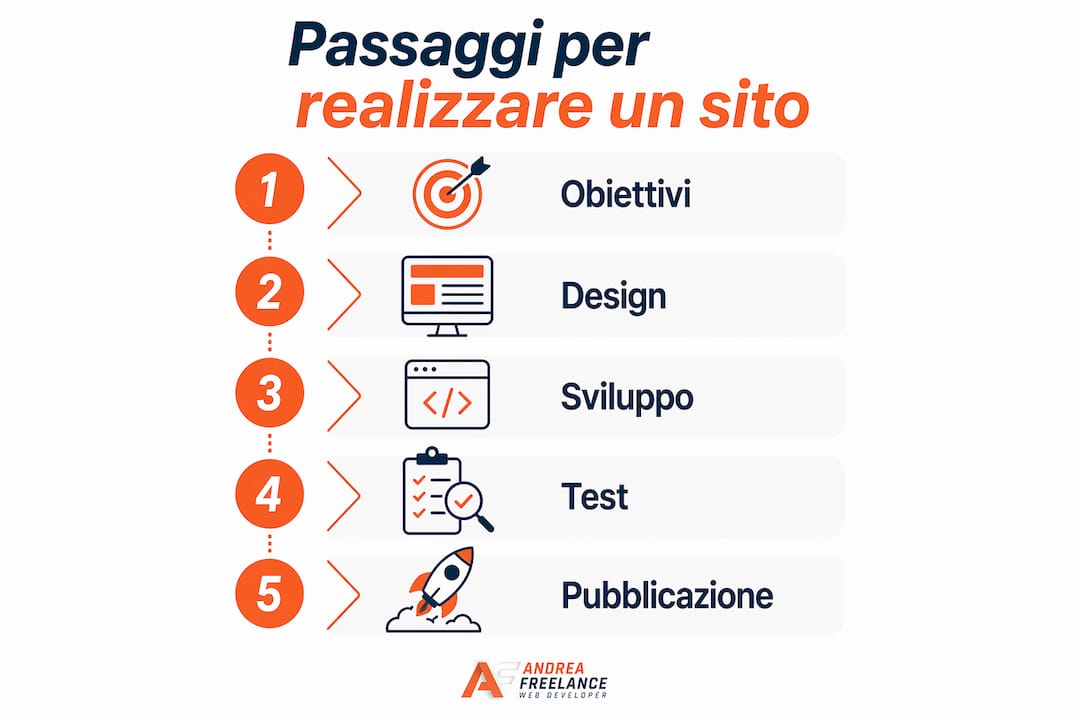
A structured process avoids costly rework and ensures a result that is consistent with your objectives. Following a web project workflow This clearly reduces development times and improves the final quality of the website.
-
Define your objectives and target audience. Decide what you want the website to do: generate enquiries, sell a course, showcase your portfolio? Identify the type of customer you want to attract and write for them, not for yourself.
-
Plan the page architecture. Draw up a site map before writing a single line of text. Decide how many pages are needed, how they link to one another, and the path a visitor takes from their first visit to making a contact enquiry.
-
Create the content before the design. The text dictates the layout, not the other way round. A website for professionals It must clearly explain what you do and why someone should choose you. Write straightforward text, without unnecessary jargon, with one main message per page.
-
Choose and customise your WordPress theme. Choose a lightweight theme that is compatible with the main page builders and optimised for speed. Customise the colours, fonts and layout to reflect your professional identity. Avoid themes with dozens of features you’ll never use: they slow down your website without adding any value.
-
Configure the technical elements. Install an SSL certificate for a secure HTTPS connection, set up a clear and readable URL structure (e.g. /services/marketing-consultancy), enable caching to improve speed, and link Google Analytics to monitor traffic.
-
Test the website before it goes live. Check that all pages load correctly on desktop and mobile devices. Check the contact forms, internal links and loading speed using Google PageSpeed Insights. A slow website or one with technical errors can damage your first impression and your Google ranking.
Pro tip: Before publishing, ask someone from outside your sector to browse the site for five minutes. If they don’t immediately understand what you do and how to contact you, the site has a problem with clarity, not design.
| Stage | Main activity | Expected result |
|---|---|---|
| Objectives | Define the website’s target audience and purpose | A clear and measurable brief |
| Architecture | Site map and navigation | Logical and intuitive structure |
| Contents | Texts, images and case studies | Clear messages for every page |
| Design | Theme, colours, fonts and layout | A consistent visual identity |
| Technique | SSL, cache, URL, Analytics | A fast and monitorable website |
| Testing and launch | Check on all devices | Website 100% operational |
How can I optimise my website for visibility on Google?
Technical SEO should be planned right from the design stage, not added on afterwards. Structuring URLs correctly, using H1, H2 and H3 tags hierarchically, and ensuring fast loading times are architectural choices that influence search rankings for months. A website that is poorly built from a technical point of view requires costly interventions to be rectified.
Local SEO significantly increases your ability to attract customers from your local area. For a freelancer working in a specific town, appearing in local search results is just as valuable as appearing in national search results. Creating and optimising a Google Business Profile, including the town’s name on key pages and collecting verified reviews are practical steps that have a direct impact on traffic.
The key SEO measures for a freelance website include:
- Keyword search: Identify the terms your potential customers use on Google, not the ones you use in your industry.
- Optimised meta descriptions: Write a description of 150–160 characters for each page, including the main keyword and a clear call to action.
- Website speed: Use a hosting service with SSDs, enable caching and compress your images. Google considers speed to be a direct ranking factor.
- Internal links: Link the pages of the website together in a logical way. This helps Google understand the site’s structure and distributes authority amongst the pages.
- Updated content: Publish articles or regular updates. A professional blog with useful content attracts organic traffic and strengthens your authority in the sector.
For WordPress users, plugins such as Yoast SEO or Rank Math guide the optimisation of each page with visual indicators and practical tips. These tools analyse keyword density, text readability and the completeness of metadata. Understanding the practical benefits of SEO For a freelancer, this means recognising that every position gained on Google represents one more potential client, without any recurring advertising costs.
A good-looking website isn’t enough: you need a solid technical foundation and an SEO strategy planned from the outset to ensure its visibility.
Pro tip: Link Google Search Console to your website as soon as you publish it. This free tool shows you which keywords are driving traffic, which pages Google has indexed, and whether there are any technical errors that need fixing.
What mistakes can undermine a freelancer’s website?
The most common mistake is to focus on aesthetics whilst neglecting SEO and usability. Concentrating solely on design without taking the technical structure into account results in websites that are visually appealing but invisible on Google. A website that cannot be found does not attract customers, no matter how attractive it is.
Here are the most common mistakes and how to avoid them:
- Confusing navigation: menus with too many items, pages without a clear purpose and navigation paths that confuse visitors. The solution is a simple structure with no more than five items in the main menu.
- General texts: Phrases such as “we offer tailor-made solutions to meet your needs” mean nothing. Every page must answer a specific question from the customer: what do I do, for whom, and with what results.
- Missing or weak calls to action: if a visitor doesn’t know what to do after reading a page, they’ll leave. Every page must have a clear call to action: “Request a quote”, “Book a free consultation”, “Download the guide”.
- No post-launch maintenance: WordPress and its plugins require regular updates for security and performance reasons. A neglected website becomes vulnerable to attacks and loses its ranking on Google over time.
- Lack of social evidence: testimonials, reviews and case studies help build visitors’ trust. The online reputation It is a key factor in purchasing decisions, including for professional services.
Pro tip: Schedule a quarterly review of the website: check that the content is up to date, that the links are working and that the pages load quickly. Thirty minutes every three months can prevent problems that would otherwise take days to resolve.
Underestimating the importance of maintenance is a mistake that comes back to haunt you over time. A website that is not kept up to date gradually drops down the search results, accumulates security vulnerabilities and conveys an image of a lack of professional care. Relying on a managed maintenance service solves this problem without requiring in-house technical expertise.
Key points
Creating an effective website for a freelancer requires a solid technical foundation, clear content and an SEO strategy that is integrated right from the design stage.
| Full stop | Details |
|---|---|
| Technical basis | A domain name, SSD hosting and WordPress form the basic framework for a professional website. |
| Targeted content | Each page must answer a specific question from the customer and include a clear call to action. |
| SEO from the design stage | URL structure, hierarchical tags and page speed should be planned before building the website, not added afterwards. |
| Local SEO | Optimising for your own town and setting up a Google Business Profile increases qualified traffic. |
| Ongoing maintenance | Regular updates to WordPress and plugins ensure security and maintain search engine rankings over time. |
The website I’ve seen transform freelance careers
After more than 20 years of working on websites for professionals, I’ve learnt one thing that no course teaches: the website isn’t the technical problem you think it is. The real problem is that most freelancers don’t know what they want the website to do. They come in with vague ideas about “having an online presence” and are surprised when the website doesn’t bring in clients.
A freelancer’s website needs to do one thing better than anything else: convince the right visitor to get in touch with you. It doesn’t have to appeal to everyone. It doesn’t have to showcase everything you can do. It needs to speak directly to the person who has the problem that you’re best placed to solve.
I’ve seen consultants with technically flawless websites who didn’t receive a single enquiry a month. And I’ve seen professionals with simple, almost spartan websites who generated three or four qualified leads a week. The difference always lay in the content and the clarity of the message, never in the design.
Another mistake I often see is treating the website as a finished project. A website that doesn’t evolve loses its relevance. Google rewards websites that are regularly updated. Customers trust professionals who demonstrate recent activity. Even just one article a month, a new testimonial every quarter or an updated services page makes a measurable difference to traffic and conversions.
My practical advice: before you think about the design, write a sentence that answers this question: “I help [type of client] to [solve a specific problem] thanks to [your distinctive expertise].” If you can’t write it in fewer than twenty words, the website won’t work, because you haven’t yet clarified your positioning. Start there.
— Andrea
Andreafreelance for your professional website
Andreafreelance creates bespoke websites for freelancers and consultants, with over 20 years’ experience in WordPress, WooCommerce and Prestashop. Every project begins with an analysis of the client’s objectives and target audience, to build a website that delivers tangible results in terms of visibility and client acquisition. Services include bespoke website development, SEO optimisation, landing page creation and ongoing maintenance. If you already have a website that isn’t performing well, the rebranding workflow Andreafreelance identifies the key issues and resolves them with a clear action plan. Contact Andreafreelance for an initial consultation and find out what your website needs to really work for you.
Frequently Asked Questions
How much does it cost to build a website as a freelancer?
The cost varies depending on the complexity of the project, the number of pages and the features required. A professional WordPress website with basic SEO starts at a few hundred euros and may increase depending on the level of customisation.
Can I build the website myself using WordPress?
WordPress allows you to create a professional website even without advanced technical skills, but SEO configuration, security and performance require specialist knowledge to achieve tangible results.
Which pages are essential for a freelancer’s website?
The essential pages are: About Me, Services, Portfolio or Case Studies, and Contact. Each page must have a clear objective and a specific call to action to guide the visitor towards making contact.
How long does it take to rank on Google?
The first organic SEO results are generally seen 3–6 months after the website has been optimised. Local SEO, with an active Google Business Profile, can deliver faster results for geographically specific searches.
Do I need to update the website after it’s gone live?
Yes. WordPress and its plugins require regular updates for security and performance. Content should also be reviewed periodically to ensure it remains relevant in search results and conveys a professional, up-to-date image.