

Many small and medium-sized businesses have WordPress websites that are not realising their full potential. Slow-loading pages, security vulnerabilities and poor SEO rankings are hampering their online visibility and conversions. Professional WordPress support turns these problems into tangible opportunities, improving performance, security and business results. This guide shows you how to get effective support and which technical measures really make a difference to your business.
Contents
- Why choose a professional WordPress support service
- Preparing to receive support: requirements and necessary tools
- How WordPress support is carried out: key steps and optimisations
- Monitoring, maintenance and troubleshooting common issues
- Discover professional WordPress support services for your business
- Frequently Asked Questions about WordPress Support for SMEs
Key points
| Full stop | Details |
|---|---|
| Professional support | It guarantees security, regular updates and ongoing SEO optimisation for your website |
| Performance and Core Web Vitals | Targeted measures reduce loading times and improve key Google metrics |
| Effective preparation | Hosting access, up-to-date backups and login details facilitate rapid and effective interventions |
| Ongoing maintenance | Regular monitoring prevents problems and maintains high performance over time |
Why choose a professional WordPress support service
Managing a WordPress site on your own may seem straightforward at first, but the technical complexities soon become apparent. Outdated themes, incompatible plugins and sub-optimal configurations lead to security issues and slow performance. For SMEs with limited resources, these challenges become real barriers to digital growth.
A specialist support service tackles these challenges with targeted expertise. The professionals ensure timely updates to the WordPress core, themes and plugins, drastically reducing the risk of vulnerabilities. The right support ensures faster and more secure websites, improving search engine rankings and the user experience. The work involves advanced customisation, database optimisation and specific server configurations.
Optimisation for Core Web Vitals represents a key competitive advantage in 2026. Google considers Largest Contentful Paint (LCP), Cumulative Layout Shift (CLS) and Interaction to Next Paint (INP) to be key ranking factors. A WordPress expert optimises these metrics through lazy loading, WebP image compression, and CSS and JavaScript minification. The web services for businesses Professional services include detailed analyses using PageSpeed Insights and continuous monitoring tools.
Pro tip: Always check that the professional uses a staging environment to test changes before applying them to the live site, thereby avoiding service interruptions.
Entrepreneurs save valuable time by outsourcing technical management. Instead of having to deal with PHP errors, plugin conflicts or caching issues, they can focus on their core business. One freelance WordPress developer The expert quickly identifies the causes of malfunctions and implements lasting solutions. Advanced techniques for optimise WordPress performance These include custom CDN configurations, database query optimisation and the implementation of multi-level caching.
The main benefits of professional support:
- Enhanced security with firewalls, automatic backups and malware monitoring
- Improved speed through advanced technical optimisations and server configurations
- SEO enhanced with Schema markup, image optimisation and a correct URL structure
- Responsive support to resolve emergencies and urgent technical issues
- Updates managed without the risk of incompatibility or data loss
Preparing to receive support: requirements and necessary tools
Effective collaboration with a WordPress professional requires proper preparation. Before starting any work, you need to gather essential information and tools that speed up diagnosis and implementation. Incomplete credentials or out-of-date backups slow down the process and increase costs.
Your login details are the essential starting point. You will need administrator access to the WordPress dashboard, FTP or SFTP credentials to manage files directly on the server, and access to the hosting control panel (cPanel, Plesk or similar). Effective interventions require access to hosting, credentials, up-to-date backups and performance monitoring. Many SMEs do not document this information, leading to avoidable delays.
Pro tip: Use a business password manager such as 1Password or Bitwarden to organise your login details securely and share them temporarily with external collaborators.
High-performance hosting forms the basis for any optimisation. Cheap shared servers drastically limit the improvements that can be made. VPS or managed WordPress hosting offer dedicated resources, integrated server caching and optimised PHP configurations. Check that your plan includes HTTP/2 support, free SSL certificates and automatic daily backups. The professional website design It always starts with a solid infrastructure.

Analytics tools provide a baseline against which to measure improvements. Google PageSpeed Insights, GTmetrix and WebPageTest generate detailed reports on Core Web Vitals and performance. Google Search Console identifies indexing errors and mobile usability issues. This data guides the prioritisation of actions and documents the progress made.
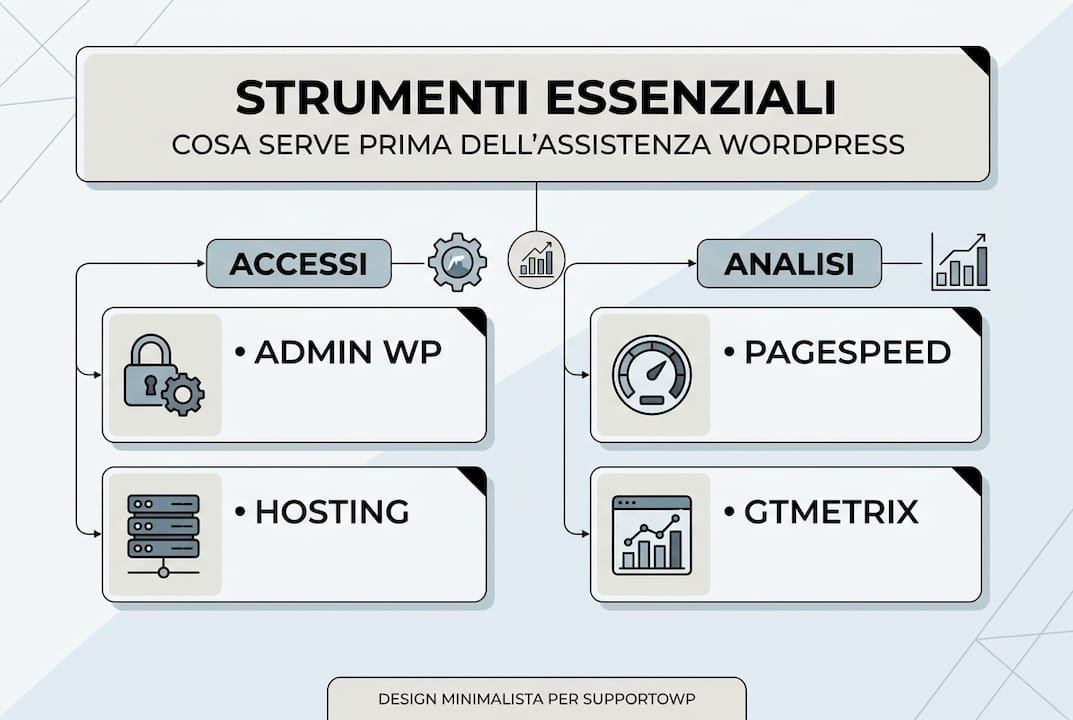
| Element | Description | Importance |
|---|---|---|
| WordPress credentials | Administrator username and password | Review |
| FTP/SFTP access | Host, port, username, password | High |
| Hosting control panel | URLs and cPanel/Plesk login details | High |
| Recent backup | Complete file and SQL database | Review |
| PageSpeed Report | Screenshot of current results | Media |
| DNS lookups | Domain Management Panel | Media |
Preparing these materials before your first appointment with the professional saves time and money. Efficient care begins with comprehensive documentation and verified access details.
How WordPress support is carried out: key steps and optimisations
Professional WordPress support follows a structured process that guarantees measurable results without compromising the stability of the website. Each stage requires specific skills and the right tools to identify problems, implement solutions and verify improvements.
- A comprehensive initial analysis of the existing website, including a technical SEO audit, a performance assessment using diagnostic tools, a security check and review of known vulnerabilities, and a complete inventory of active themes and plugins.
- Planning of priority actions based on business impact, setting a realistic timeline for implementation, preparing a staging environment for secure testing, and documenting the current status for reference.
- Implementation of technical optimisations in line with established best practices; a full backup prior to any significant changes; and functional testing following any critical intervention.
- Final verification using automated tools and manual tests, comparison of metrics before and after the intervention, and documentation of the changes made for future reference.
Essential techniques include caching, CDNs, WebP image conversion and database optimisation. Caching plugins such as WP Rocket or W3 Total Cache reduce the load on the server by generating static versions of pages. Configuration requires careful attention to exclusions for dynamic content, browser cache settings and GZIP compression.
Pro tip: Always test the cache with users who are not logged in and on different devices, as some configurations can cause display issues on mobile devices or for registered users.
Content Delivery Networks distribute static assets across global servers, reducing latency for visitors in distant locations. Cloudflare offers an effective free plan for SMEs, whilst premium solutions such as KeyCDN or BunnyCDN guarantee superior performance. Integration requires DNS changes and the configuration of specific plugins.
| Method | Benefits | Disadvantages | Cost |
|---|---|---|---|
| Caching plugins | Easy to set up, effective for medium traffic volumes | Requires manual optimisation | Free or 50 euros a year |
| Free CDN | Reduces overall latency, improves security | Limited functionality | Free |
| Premium CDN | Top performance, priority support | Variable monthly cost | From 10 euros a month |
| Managed hosting | Built-in cache, no configuration required | Higher cost, less control | From 25 euros a month |
Converting images to WebP format reduces file sizes by up to 30% whilst maintaining visual quality. Plugins such as ShortPixel or Imagify automate the process for existing media libraries and new uploads. Database clean-up removes post revisions, spam comments, expired transients and tables from uninstalled plugins, freeing up space and speeding up queries.
Work on the Best practices for WordPress websites These include CSS and JavaScript minification, lazy loading for images and iframes, preloading of critical resources, and font optimisation using font subsets and font display swaps. Every change is tested on the staging environment before being deployed to production.
Monitoring, maintenance and troubleshooting common issues
Maintaining the performance achieved requires constant attention and preventative measures. A WordPress site is never truly complete; it is constantly evolving with new content, software updates and changes to security requirements. Proactive monitoring identifies issues before they affect users and the business.
Effective monitoring strategies combine automated tools with regular manual checks. Uptime Robot or Pingdom send immediate notifications in the event of downtime. Google Search Console flags indexing errors, mobile issues and penalties. Regular maintenance and monitoring help keep LCP below 2 seconds, CLS below 0.1 and INP below 200 ms. Customised dashboards aggregate key metrics for quick assessments.
Pro Tip: Set up custom alerts for critical metrics such as server response times exceeding 600ms or availability below 99.%, enabling immediate action before issues become apparent to users.
The frequency of maintenance varies depending on the complexity and traffic levels of the website. Standard corporate websites require monthly checks for updates, backups and performance monitoring. E-commerce sites or high-traffic portals require weekly checks. WordPress core, theme and plugin updates should be applied promptly following testing on a staging environment, whilst balancing security and stability.
Common mistakes include:
- White screen of death caused by plugin conflicts or insufficient PHP memory
- 500 Internal Server Errors caused by corrupted .htaccess files or server limits
- Cache issues causing outdated content or blank pages to be displayed
- Sudden slowdown due to a non-optimised database or brute-force attacks
- Mixed content errors following HTTPS migration for resources loaded via HTTP
Resolving these issues requires a methodical approach. Deactivate plugins one at a time to identify conflicts. Check the server error logs for specific diagnostic messages. Clear all caches (plugins, browser, CDN, server). Restore the core WordPress files from a clean installation. Increase PHP memory limits, maximum execution time and upload size where necessary.
Backups are essential protection against disasters. Solutions such as UpdraftPlus or BackWPup automate full backups to external cloud storage. Set up a retention policy that keeps daily copies for a week, weekly copies for a month and monthly copies for a year. Test the restoration process periodically to check the integrity of the backups.
Maintaining optimal Core Web Vitals requires ongoing monitoring, as new content, updated plugins or changes to hosting can degrade performance even after initial optimisations have been carried out perfectly.
Keeping detailed records of every change makes it easier to troubleshoot issues in the future. Record configuration changes, plugins installed or removed, problems encountered and solutions implemented. This internal knowledge base speeds up diagnosis and prevents errors from recurring. Updating WordPress correctly requires technical expertise that many SMEs do not have in-house.
Discover professional WordPress support services for your business
If managing your WordPress site yourself takes up valuable time that could be spent on your core business, consider seeking support from specialist professionals. The web services for businesses offered by Andrea Freelance cover every aspect of your digital presence, from initial set-up to ongoing optimisation.
With over 20 years’ experience in web development, Andrea helps SMEs and professionals boost their online visibility. His services include comprehensive WordPress technical support, advanced SEO optimisation, redesign of existing websites and the implementation of e-commerce solutions. A freelance webmaster – website design A dedicated team ensures personalised attention and bespoke solutions tailored to your specific needs.
The website positioning and SEO It represents a strategic investment to increase qualified traffic and conversions. Contact Andrea for a free consultation and find out how to turn your WordPress site into an effective tool for business growth.
Frequently Asked Questions about WordPress Support for SMEs
What is WordPress support and why does my business need it?
WordPress support is a professional service that manages the technical aspects of your website: updates, security, performance optimisation and troubleshooting. For SMEs, it represents a strategic investment as it ensures business continuity, protects against vulnerabilities and improves SEO rankings. Outsourcing technical management to experts frees up internal resources for core business activities.
How long does it take to carry out a full website optimisation?
A comprehensive WordPress optimisation typically takes 2–4 weeks, depending on the complexity of the site and any existing issues. The initial analysis and planning take 3–5 days, the technical implementation 1–2 weeks, and the final testing and adjustments a further 3–5 days. E-commerce sites or complex portals may require more time to ensure stability.
How do you choose a reliable WordPress professional?
Check for documented experience with a portfolio of real clients and verifiable testimonials. Ask for references you can contact directly and assess specific technical skills such as Core Web Vitals optimisation, security and SEO. A reputable professional will always provide clear contracts, cost estimates and a staging environment for testing. Be wary of unrealistic promises or excessively low prices.
What tools are used in professional care?
Professionals use premium plugins such as WP Rocket for caching, Wordfence for security and Rank Math for SEO. Diagnostic tools include Google PageSpeed Insights, GTmetrix and Query Monitor for debugging. FTP software such as FileZilla, code editors such as Visual Studio Code and version control systems such as Git round off the toolkit. Each tool serves a specific purpose in optimisation.
How can you maintain optimum performance over time?
Plan monthly maintenance, including software updates, backup checks, database optimisation and security checks. Monitor Core Web Vitals weekly using PageSpeed Insights. Keep the number of installed plugins to the bare minimum. Invest in high-quality hosting with adequate resources. Consider ongoing support contracts for regular preventative maintenance.
How much does professional WordPress support cost on average?
Costs vary depending on the complexity and frequency of the work required. One-off optimisation projects start from 500–800 euros for standard websites. Monthly support contracts cost between 100 and 300 euros, depending on the service level. Complex projects such as migrations or website redesigns require a budget of between 1,500 and 3,000 euros. Investing in qualified support prevents higher costs arising from emergencies or data recovery.