
You’ve just decided to invest in your company’s website, but you’re faced with a maze of options: WordPress, Wix, Squarespace, bespoke solutions, agencies, freelancers. Every consultant tells you something different, and every quote seems incomparable to the last. This situation is more common than you might think, and it often leads to hasty decisions that prove costly in the long run. Choosing the wrong platform means not only wasting your budget, but also holding back your business’s digital growth at a time when the online market is more competitive than ever.
Contents
- Understanding digital needs: the starting point for making a choice
- Types of web platforms: an overview and comparison
- Essential features for SMEs and professionals
- Practical steps to help you choose (and avoid making mistakes)
- Common mistakes and how to avoid them
- Our view: personalisation beats the quick fix
- Professional solutions for your digital presence
- Frequently asked questions about choosing a web platform
Key Points
| Full stop | Details |
|---|---|
| Clarity of objectives | Defining the website’s objectives and priorities is the first crucial step towards making the right choice. |
| Not all platforms are the same | There are solutions that are better suited to specific sectors, requirements or budgets. |
| Features matter | Mobile optimisation, SEO and ease of management are not optional extras but essential requirements. |
| Watch out for common mistakes | Carefully assessing maintenance, hidden costs and support helps prevent future problems. |
| Tailor-made solutions are the way forward | A website tailored to your business delivers better and more lasting results than an off-the-shelf solution. |
Understanding digital needs: the starting point for making a choice
Before evaluating any platform, you need to take a step back and answer a fundamental question: what exactly does your website need to do? It sounds obvious, but most mistakes stem precisely from this – from a vague or incomplete answer.
Define the website’s objectives
The objectives of a website for SMEs and professionals fall into four main categories:
- Company profile: to present the company, its products or services to potential customers, and to build credibility and authority within the sector.
- Lead generation: gather qualified leads via forms, landing pages, special offers or downloadable content.
- E-commerce: sell products or services directly online, and manage orders, payments and logistics.
- Blogs and content marketing: publish content to attract organic traffic from search engines and build a community of loyal readers.
A company website often combines more than one of these objectives. A craftsperson, for example, might want to showcase their portfolio (showcase) and collect requests for quotes (lead generation). A consultant might combine a professional blog with a services section. Understanding this combination from the outset allows you to choose a platform that truly supports all your needs, without having to overhaul everything after six months.
“Having clear objectives is the most effective way to weed out the wrong options. Before speaking to any supplier, write down exactly what you want your website to achieve over the next 12 months.”
Budget, timelines and scalability
The budget isn’t just the initial development cost. You need to take into account recurring costs: hosting, domain registration, licence renewals, updates, maintenance, and premium plugins or extensions. A platform that seems cheap at the outset can become very expensive over time if it requires constant customisation or if the features you need are all subject to a charge.

Scalability is another critical factor. Your website must be able to grow with you. If you currently have 10 products but will have 500 in two years’ time, you need a platform that can handle this load without requiring a complete migration. Always consider your business’s growth trajectory, not just the current situation. If growth involves expanding abroad, the Guide to the multilingual WordPress site shows you how to set up languages and URLs right from the start.
Exploring the web services for businesses When you look at the options available today, you’ll realise that professional solutions cater to a wide range of budgets whilst maintaining high standards of quality. Understanding the features of a professional website It helps you distinguish between what is essential and what is superfluous.
In-house expertise and autonomous management
One aspect that is often overlooked is your team’s ability to manage the website independently after handover. If no one in the company is familiar with the technology, a technically advanced but complex platform could become a burden. Conversely, if you have an in-house specialist dedicated to digital communications, you might want to opt for a more flexible and customisable system.
Pro tip: Before choosing a platform, give it a go. Many CMSs and website builders offer free trials. Ask the person who will be managing the site to try creating a page or editing some content. If they get stuck after five minutes, that platform isn’t suitable for your operational context.
Types of web platforms: an overview and comparison
Now that you’ve got a clear idea of what you need, it’s time to explore the options available. Web platforms can essentially be divided into three categories, each with its own specific features, advantages and limitations.
Open-source CMS
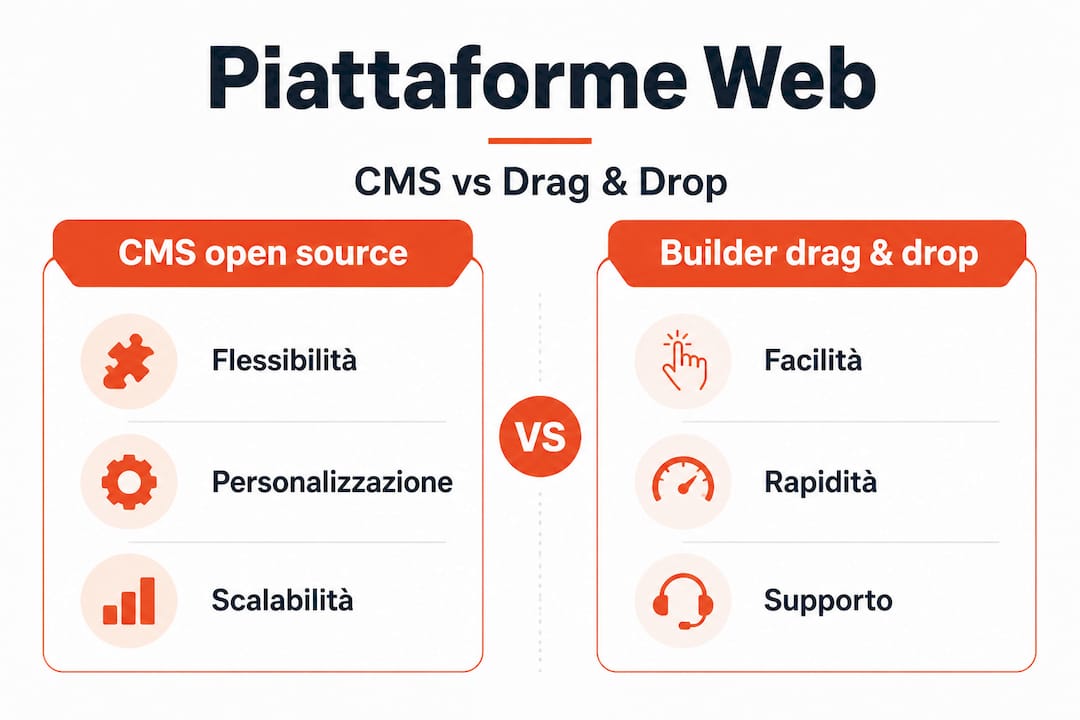
Open-source CMSs (Content Management Systems) such as WordPress and Joomla are free and highly customisable. WordPress, in particular, accounts for over 43 per cent of websites worldwide – a figure that speaks for itself in terms of the ecosystem’s reach and reliability.
The main advantage is flexibility: thousands of plugins and themes allow you to build any kind of website, from a simple showcase site to a complex e-commerce site. The disadvantage is that they require a certain level of technical expertise for the initial set-up and ongoing maintenance.
Drag-and-drop builder
Tools such as Wix and Squarespace are designed for those who want to build a website without writing a single line of code. The visual interface is intuitive, the templates are aesthetically pleasing and the publishing process is quick.
However, these tools have significant limitations when it comes to advanced SEO, in-depth customisation and data portability. If you ever want to migrate to another platform, you could lose a large part of the work you’ve done.
Customised solutions
Solutions developed from scratch are the choice for those with very specific requirements that no standard platform can meet. They offer maximum flexibility but require higher investment and longer development times.
Here is a comparison table to help you get your bearings quickly:
| Criterion | Open-source CMS (WordPress) | Drag-and-drop builder (Wix) | Custom solution |
|---|---|---|---|
| Initial cost | Low/Medium | Bass | High |
| Cost over time | Medium | Medium/High | Variable |
| Flexibility | High | Low/Medium | Maxim |
| SEO | Excellent | Limited | Excellent |
| Self-management | Media | Easy | Difficult |
| Scalability | High | Limited | High |
| Data portability | High | Low | High |
| Plugin ecosystem | Enormous | Limited | Nobody |
Find out more about the advantages of WordPress It helps you understand why this platform remains the preferred choice of professionals and SMEs around the world, especially when aiming for tangible and long-lasting SEO results.
Key points to bear in mind when comparing platforms:
- Drag-and-drop website builders are excellent for simple, temporary websites, but they can be limiting for projects with ambitions for growth.
- WordPress offers the best balance between flexibility, cost and SEO capabilities for most Italian SMEs.
- Custom solutions only make sense when the technical requirements are truly unique and the budget allows for it.
Essential features for SMEs and professionals
Regardless of which platform you choose, there are certain features you simply cannot afford to overlook. These are elements that have a direct impact on your online visibility, the user experience and your ability to convert visitors into customers.
SEO: the foundation of everything
SEO (Search Engine Optimisation) is the set of techniques that enable your website to be found on search engines such as Google. An SEO-friendly platform should allow you to:
- Customise the meta tags (title and description) for each page.
- Automatically generate an XML sitemap to submit to Google Search Console.
- Keep URLs clean and descriptive (e.g. “/services/marketing-consultancy”)
instead of/?p=123`). - Check the loading speed, measured using metrics such as TTFB (Time To First Byte), which is the time it takes for the server to respond to the browser’s first request.
- Support structured data (schema markup) to enhance search results.
The key features of corporate websites always incorporate a solid SEO strategy, because without visibility on search engines, even the most attractive website remains invisible.
Mobile responsiveness
Over 60 per cent of online searches are carried out on mobile devices. Google uses what is known as “mobile-first indexing”, which means that it indexes and ranks your website primarily based on its mobile version. A platform that does not guarantee a responsive layout that performs well on smartphones is simply out of the running.
Content management and integrations
The ease with which you can update your website is crucial to keeping it up to date and relevant. A well-structured CMS allows you to publish articles, update product details, change prices and add new pages without having to call in a developer every time.
Equally important is the ability to integrate with external tools: CRM systems for customer management, email marketing platforms, payment systems, analytics tools and automation tools. The most effective web-based business solutions are those that integrate seamlessly with the digital ecosystem already in use within your organisation.
| Features | Importance | Notes |
|---|---|---|
| Customisable meta tags | Review | Essential for on-page SEO |
| Automatic XML sitemap | High | It makes indexing easier |
| Responsive design | Review | Mandatory for mobile-first |
| Loading speed | Review | It affects SEO and conversions |
| SSL Certificate | Review | Security and Google rankings |
| CRM/email integration | High | Marketing automation |
| Automatic backups | High | Data protection |
| Security updates | High | Preventing attacks |
Pro tip: Always test the loading speed of a sample website on the platform you’re evaluating using Google PageSpeed Insights. A score below 70 on mobile is a red flag that you mustn’t ignore.
Practical steps to help you choose (and avoid making mistakes)
You’ve identified your requirements, you’re familiar with the different types of platforms, and you know which features to look for. Now it’s time to take action with a clear and structured sequence of operational decisions.
- Write a detailed brief. Set out the objectives, required features, maximum budget, timelines and who will manage the website internally. This document will help you compare quotes objectively.
- Select the type of supplier. You have three main options: a web agency, a specialist freelancer or a self-service platform. Each option has its pros and cons in terms of cost, flexibility and quality of support.
- Ask for at least three comparable quotes. Make sure that each quote clearly specifies what is included: design, development, content, initial SEO, training and post-launch support.
- Assess the post-launch technical support. A website is not a finished product: it requires constant updates, corrections and optimisation. Check whether the provider offers a maintenance plan and under what terms.
- Assess the scalability of the solution. Ask explicitly: “If, in two years” time, I want to add an e-commerce site or triple the number of pages, what will that entail in terms of costs and time?”
- Check their references and portfolio. Don’t just take their word for it. Take a look at the websites they’ve already created, contact some of their previous clients if possible, and check that the promised results have actually been achieved.
- Please read the contract carefully. Check who owns the domain and the content, what the terms are for terminating the contract, and what happens if you want to switch providers in the future.
“Hiring an experienced professional isn’t an expense: it’s the safest way to avoid the hidden costs of a hasty decision.”
Read the advice on building the website helps you prepare as well as possible before meeting any supplier. If you’re considering hiring a self-employed professional, the guide on how to choose a freelancer It sets out all the criteria to be taken into account when creating the website.
It is worth noting that, according to recent research on the’B2B marketing automation, companies that integrate automation tools into their website from the outset achieve significantly better results in terms of customer acquisition and retention. This is something to bear in mind right from the stage of choosing a platform.
Pro tip: When evaluating a freelancer or an agency, always ask: “Can you show me an example of a website you’ve created with objectives similar to mine, and what results it achieved in terms of traffic or conversions?” A vague answer or a lack of concrete data is a warning sign that should not be underestimated.
Common mistakes and how to avoid them
Even with the best of intentions, many SMEs and professionals make the same mistakes when choosing a web platform. Knowing what these are in advance enables you to avoid them deliberately.
Underestimating future management
A website doesn’t end with its launch: that’s just where it begins. Many business owners choose a platform based solely on its initial visual appeal, without considering who will update the content, who will manage backups, or who will step in if technical problems arise. This results in websites that are already outdated after six months, with content frozen at the date of publication and out-of-date plugins that become security vulnerabilities.
- Always check that the platform has an active community and up-to-date documentation.
- Plan an annual budget for routine maintenance: it is not an optional expense.
- Train at least one member of staff in the basic operations of the CMS.
Neglecting SEO when making a choice
Choosing a platform with structural SEO limitations is a mistake that will cost you in the long run. Some platforms do not allow you to customise URLs, generate redundant HTML code that slows down page loading, or do not support structured data properly. These issues are difficult to rectify retrospectively without a complete migration.
Understanding the benefits of corporate websites When done properly, this helps you understand just how much technical SEO is an integral part of a high-quality web project, rather than an afterthought.
Trusting solutions that are “too good to be true”
A fully-fledged website for 200 euros, guaranteed Google ranking within 30 days, and an e-commerce site with 1,000 products for a ridiculously low fixed monthly fee. These offers do exist, and they attract many entrepreneurs looking to save money. The problem is that they almost always conceal additional costs, poor quality, generic, non-optimised templates and non-existent support.
Pro tip: Use price as an indicator of relative, rather than absolute, quality. A well-designed, professional website has a minimum cost that reflects the actual work involved. If a quote seems too good to be true, ask yourself what has been sacrificed to achieve that price.
- Be wary of anyone who promises guaranteed SEO results in a very short space of time: that’s not how Google works.
- Always check who owns the domain: it must be registered in your name, not the provider’s.
- Read the cancellation terms: some platforms make it very difficult and expensive to withdraw from the contract.
Our view: personalisation beats the quick fix
After more than 20 years working in web development, I have seen hundreds of cases where choosing the “easiest” or “cheapest” platform has turned out to be the most expensive option in the medium term. And I’m not just talking about money: I’m talking about missed opportunities, SEO rankings that were never achieved, and customers who couldn’t find the website because it was slow, unclear or not optimised for mobile.
The uncomfortable truth is this: many Italian SMEs treat their website as an expense to be kept to a minimum, when they should treat it as a strategic asset to be optimised. A physical shop isn’t fitted out with scrap materials just to save money on the fittings. Why should a digital shop be any different?
Off-the-shelf platforms have their place, particularly for those starting from scratch with limited budgets and simple objectives. But when a business or professional really wants to compete online, acquire customers systematically and build a solid digital identity, a bespoke solution is not a luxury: it is the most sensible choice. The most lasting results I have seen in my work always come from bespoke projects, where every technical decision is driven by the client’s specific objectives.
There is also another aspect that is rarely discussed: trust. A carefully designed, fast, secure and well-ranked website conveys professionalism. Your potential customers pick up on this straight away, even if they know nothing about technology. Understanding Why create a website for your business? Acting professionally means realising that you are investing in the first impression you make on the market. And in the digital world, that first impression lasts just a few seconds.
Technological shortcuts do exist and can make sense in certain contexts. But when it comes to building the digital presence of a company that wants to grow, personalisation is not an option: it is the difference between a website that works for you and one that simply exists.
Professional solutions for your digital presence
If this guide has helped you gain a clearer understanding, the next step is to turn that understanding into concrete action. On andreafreelance.com You’ll find a professional with over 20 years’ experience in creating websites for Italian SMEs and professionals, specialising in WordPress, WooCommerce and Prestashop. Every project is bespoke, tailored to the client’s specific needs and real business objectives. Whether you need a corporate website, a high-performing e-commerce site or a strategy for SEO positioning Effective – you can count on practical, measurable solutions. Discover all the professional web services available and start the digital transformation of your business today.
Frequently asked questions about choosing a web platform
What are the main criteria for choosing a web platform?
The key elements are flexibility, ease of content management, built-in SEO optimisation, the ability to integrate with external tools, and the availability of reliable technical support over the long term.
What are the risks of choosing a platform that’s too cheap?
You risk encountering structural limitations in your website’s growth, SEO shortcomings that are difficult to rectify retrospectively, and difficulties in meeting your business’s future needs without having to undertake costly migrations.
Is it better to use a freelancer or an agency to build the platform?
The choice depends on your budget, the complexity of the project and the type of support you require. A specialist freelancer is often the ideal solution for flexible, bespoke projects that involve a direct and ongoing relationship with the professional.
How can I make sure that the platform I choose is SEO-friendly?
Check that the platform allows you to manage custom meta tags, generates automatic XML sitemaps, supports clean URLs, ensures fast loading times and is compatible with the main SEO tools such as Google Search Console and dedicated plugins.