An XML sitemap is a structured file that lists a website’s URLs and tells search engines which pages should be crawled and indexed. Understanding what sitemaps are means understanding one of the fundamental tools of technical SEO: without them, crawlers from Google, Bing and new AI-powered search engines risk overlooking important pages on your site. Tools such as Google Search Console, and WordPress with SEO plugins like Yoast and Rank Math, now make managing sitemaps accessible even to those without advanced development skills. This guide explains everything you need to know to use them correctly in 2026.
What are sitemaps and how do they work technically?
One XML sitemap It is an XML-structured file that lists a website’s URLs, helping crawlers to scan and index the content more quickly and efficiently. The term “sitemap” literally means a map of the site: a document that describes the structure of the available pages, with additional information about each one. It is not visible to users, but is a technical file intended solely for search engines.

The XML structure and the main tags
The XML format of a sitemap follows a specific structure. Each URL is enclosed within the "and contains at least the tagalong with the page’s URL. In addition to this, there are three optional but useful tags:indicates the date of the last amendment,suggests the update frequency (daily, weekly, monthly), andassigns a relative importance value between 0.0 and 1.0. Google states that it useslastmodwhen it is reliable, whereaschangefreqe‘priority’ are considered indicative and non-binding.
The technical limit for a single sitemap file is 50,000 URLs and 50 MB in uncompressed size. If this limit is exceeded, you must create a sitemap index: an XML file that lists several separate sitemap files, each dedicated to a section of the site. This division ensures compliance with Google’s guidelines for large-scale websites and is the standard solution for e-commerce sites with thousands of products or editorial portals with extensive historical archives.
How crawlers use the sitemap
Googlebot uses the sitemap as a starting point for discovering new or updated pages, but does not regard it as the sole source of truth. The primary discovery mechanism remains navigation via internal links. The sitemap acts as a supplementary signal, particularly useful for orphaned pages – that is, those that cannot be reached via links from other pages on the site. Artificial intelligence-based crawlers such as GPTBot and ClaudeBot use the sitemap as a more targeted canonical index than traditional Googlebot, making the correct and up-to-date use of these files even more important.
Pro tip: A sitemap is not a direct ranking factor. It does not improve your position in the SERPs on its own, but it optimises the crawl budget – that is, the number of pages Google crawls within a given period. For websites with hundreds or thousands of URLs, this results in faster and more comprehensive indexing.
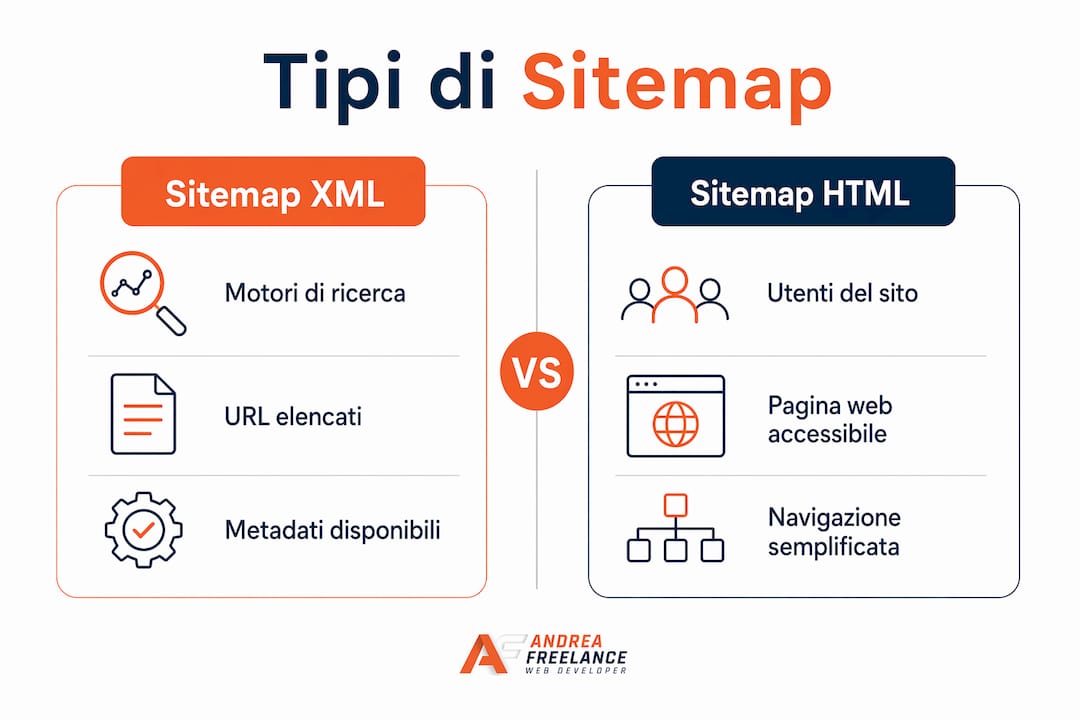
The difference between an XML sitemap and an HTML sitemap is significant. The HTML sitemap It is a web page accessible to users, used to improve navigation within the site. The XML sitemap is intended solely for search engines. Both serve distinct and complementary purposes, but when we talk about technical SEO, we are almost always referring to the XML version.
| Feature | XML Sitemap | HTML Sitemap |
|---|---|---|
| Recipient | Search engines | Website users |
| Format | Structured XML file | Web page that can be browsed |
| Main purpose | Indexing and crawling | Navigation and usability |
| Visibility | Not visible in the browser | Accessible as a normal page |
| Update | Automated via a plugin or CMS | Often manual |
What types of sitemaps are there, and when should they be used?
Not all sitemaps are the same. Google recognises several specialised formats, each designed for a specific type of content. Choosing the right format means providing crawlers with more precise information and increasing the chances of correct indexing.
| Sitemap type | Indexed content | When to use it |
|---|---|---|
| Standard XML | Web page URLs | Always, for any website |
| Image sitemap | Image file with metadata | Websites featuring galleries, e-commerce and portfolios |
| Video sitemap | Video content with title and duration | Blogs with videos, media platforms |
| News Sitemap | Recent news articles | Newspapers, current affairs blogs |
| HTML Sitemap | Site navigation structure | Sites with complex architectural features |
The image sitemap allows you to include metadata such as title, caption, licence and geolocation for each image. For an e-commerce site with hundreds of product photos, this sitemap significantly boosts visibility in Google Image Search. The video sitemap It works in a similar way: it includes the title, description, duration and thumbnail URL, making it easier for Google to index the video in its search results.
The sitemap news This is a special case. Google uses it for its Google News service and requires that articles have been published within the last 48 hours. It is not suitable for evergreen content, but it is essential for news organisations and blogs that publish news on a daily basis. For a professional or entrepreneur running a corporate blog with regular updates, incorporating a news sitemap can significantly speed up the indexing of new content.
The choice is not mutually exclusive: you can – and often should – use several types of sitemap at the same time. A WordPress site with a blog, a photo gallery and video content benefits from three separate sitemap files, coordinated by a main sitemap index. This level of detail provides crawlers with an accurate picture of every type of content on the site.
How to create and manage a sitemap for WordPress and other CMSs
Creating an effective sitemap depends on the platform you use. For WordPress sites, the most straightforward approach is to use dedicated SEO plugins, which automate the generation and updating of the XML file.
WordPress plugins: Yoast vs Rank Math
WordPress version 5.5 onwards It automatically generates a simple XML sitemap at the root of the site, but for more complex requirements, it is recommended to use dedicated SEO plugins. This built-in sitemap is sufficient for simple websites, but it limits the level of customisation required for professional projects. Yoast SEO and Rank Math bridge this gap with advanced features.
Advanced SEO plugins such as Yoast and Rank Math offer more comprehensive features than WordPress’s native sitemap: they allow you to include specific content types such as images and videos, and automatically exclude pages with ‘noindex’ tags. Rank Math also adds support for multiple sitemaps and the ability to set custom priorities by content category.
Manual creation and bespoke websites
For websites developed using frameworks such as Next.js, the sitemap is generated via a file sitemap.ts in the directory app, which dynamically exports the site’s URLs. This approach is more flexible than any plugin: it allows you to include URLs generated dynamically from a database, exclude pages based on application logic, and update the file with every build. For custom sites written in PHP or other languages, there are dedicated libraries such as spatie/laravel-sitemap for Laravel or Python scripts that query the database and generate the XML file.
What to include and what to exclude
This is where many websites go wrong. Only canonical and indexable URLs should be included in the sitemap: noindex pages, redirects and low-quality content undermine the effectiveness of the XML file. Including the wrong pages wastes crawl budget and confuses search engines about the site’s true value.
Here is a handy list of what to exclude from the sitemap:
- Pages with meta tags
noindexactive - URLs with 301 or 302 redirects
- Duplicate pages or variants with tracking parameters (e.g.
?utm_source=...) - Low-quality pages or pages with thin content
- Login, shopping basket, checkout and members’ area pages
- URLs containing session parameters or faceted search filters
Submitting the sitemap and maintenance
Once created, the sitemap must be submitted in two ways. The first is to submit it directly via Google Search Console, which provides immediate feedback on errors, unindexed pages and crawl performance. The second is to include the directive Sitemap: [URL] in the robots.txt file, which makes it easier for all crawlers – not just Google’s – to discover the site automatically.
Pro tip: Don’t just submit your sitemap once and forget about it. Check Google Search Console regularly to ensure that all URLs are indexed correctly. A common mistake is to leave URLs in the sitemap that have since been removed or redirected, resulting in 404 error reports that undermine the perceived quality of the site.
SEO best practices for maximising visibility and crawl budget
Simply having a sitemap isn’t enough. The way you manage it determines how effectively search engines crawl and index your site. These are the practices that make a real difference.
The A sitemap is no substitute for a good internal linking structure, which remains the primary mechanism by which search engines discover pages. The sitemap is regarded as a complementary signal that reduces ambiguity regarding priority pages and increases the efficiency of the crawl budget. This means that investing in your site’s internal link structure is just as important as maintaining the XML file. To explore this topic in more depth, the guide on Technical SEO and visibility by Andreafreelance provides a comprehensive overview of the technical priorities.
The XML sitemap, as a technical governance tool, facilitates the optimisation of the crawl budget and directs crawling resources towards valuable pages, thereby indirectly improving SEO and the user experience. Careful management of the metadata and URLs to be included affects indexing performance and organic traffic.
Here are the most effective best practices to put into action straight away:
- Keep the sitemap updated in real time. Whenever you publish new content or delete a page, the XML file must reflect the change immediately. Plugins such as Yoast and Rank Math do this automatically.
- Use the sitemap index for large websites. If your website has more than 1,000 URLs, split the sitemap into themed files (pages, posts, products, images) organised under a main index. This improves readability for crawlers.
- Add the directive to the robots.txt file. The Sitemap directive in robots.txt It is a well-established best practice accepted by all search engines. It increases the likelihood that crawlers will find the sitemap, regardless of whether it is submitted manually via Search Console.
- Optimise URL metadata. The tag
lastmodmust reflect the actual date of the last significant change to the content, not the date on which the CMS was updated. Alastmod'Accurate' signals to Google that the content is up to date and warrants a new crawl. - Monitor your metrics in Google Search Console. Check the “Coverage” report regularly to identify excluded URLs, crawl errors and pages that have been crawled but not indexed. This data tells you exactly where to take action.
- Consider incorporating AI crawlers into your strategy. OpenAI’s GPTBot and Anthropic’s ClaudeBot use sitemaps to identify content to include in their models. A well-curated sitemap increases the likelihood that your content will be cited in AI-generated responses. To find out more about SEO trends for 2026 On the subject of artificial intelligence, Andreafreelance has published a dedicated guide.
For websites with thousands of pages, such as e-commerce sites built on WooCommerce or Prestashop, managing the crawl budget becomes critical. Google does not have unlimited resources to crawl every URL: a clean sitemap, free of unnecessary pages, focuses crawling efforts on the pages that generate real value for the business.
Key points
A well-managed XML sitemap is the tool that transforms your website’s technical structure into a clear and readable signal for all search engines, including the new AI-powered crawlers.
| Full stop | Details |
|---|---|
| Definition and purpose | The XML sitemap lists the site’s URLs to guide crawlers to the pages to be indexed. |
| Technical limitations | A single file supports a maximum of 50,000 URLs; if this limit is exceeded, a multi-file sitemap is required. |
| What to exclude | Noindex pages, redirects, duplicate pages and thin content should always be excluded so as not to waste the crawl budget. |
| Recommended tools | Yoast SEO and Rank Math automate the creation, updating and customisation of sitemaps in WordPress. |
| Notification to crawlers | Submit the sitemap via Google Search Console and add the directive to the robots.txt file to ensure maximum coverage. |
My view on sitemaps in 2026
With over 20 years’ experience in web development, I have seen sitemaps evolve from an optional feature to an indispensable technical component. But there is one aspect that many professionals still underestimate today: a sitemap is not a file you create once and then forget about. It is a living document that reflects the health of your website.
The most significant change over the last two years has been the arrival of AI crawlers. GPTBot, ClaudeBot and next-generation search engine bots use the sitemap differently to Googlebot: they are more selective, less inclined to explore internal links, and rely more heavily on the canonical index provided by the sitemap. This means that a disorganised sitemap, full of useless URLs or out of date, will harm your visibility not only on Google but also in AI-powered response systems, which are becoming increasingly important for organic traffic.
I have seen websites with excellent content strategies lose visibility simply because their sitemap included hundreds of URLs for WooCommerce filter pages, empty tag pages or variants with UTM parameters. The crawler was wasting resources on these pages and crawling valuable content less frequently. In those cases, fixing the issue took less than an hour of technical work and produced visible results in Google Search Console within a matter of weeks.
My advice for 2026 is this: treat your sitemap as you would a strategic document, not a system file. Review it every quarter, align it with your business priorities and use it as a reflection of your website’s technical quality. If you’d like to find out more about how to integrate sitemap management into a broader SEO strategy, the guide on SEO positioning by Andreafreelance is a good place to start.
— Andrea
Optimise your website with the help of Andreafreelance
Managing a sitemap properly requires technical skills that go beyond simply installing a plugin. If your website has a complex structure, thousands of URLs or has recently undergone a redesign, it is likely that your current sitemap is not performing to its full potential. Andreafreelance offers WordPress development services, technical SEO optimisation and website redesign with over 20 years’ experience in the sector. Every project includes a comprehensive review of the technical structure, from the sitemap to the internal linking architecture, to ensure that search engines find and index the right pages. Contact Andreafreelance for a personalised consultation.
FAQ
What is an XML sitemap?
An XML sitemap is a structured file that lists a website’s URLs along with metadata such as the last modified date and priority, helping search engines to crawl and index the content more efficiently.
Does a sitemap improve your Google ranking?
A sitemap is not a direct ranking factor, but it optimises the crawl budget and speeds up the indexing of pages, thereby indirectly helping to improve the site’s organic visibility.
How many URLs can a sitemap contain?
A single XML sitemap file supports a maximum of 50,000 URLs and has an uncompressed size of 50 MB. For larger websites, it is necessary to create a sitemap index that coordinates several separate files.
How do you submit a sitemap to Google?
The sitemap is submitted via Google Search Console in the “Sitemap” section by entering the URL of the XML file. It is also advisable to add the directive Sitemap: [URL] in the robots.txt file to make it easier for all crawlers to discover the site automatically.
Should I use Yoast or Rank Math for the sitemap in WordPress?
Both plugins manage the sitemap automatically and offer more advanced functionality than the native WordPress 5.5 sitemap. Rank Math offers greater flexibility in managing multiple indexes, whilst Yoast is more established and well-documented. The choice depends on the specific requirements of your project.